
[DevLog] #01. 데이터베이스 셋팅하기(feat. Postgres, SQLAlchemy, Docker)
목표
사담
Spring(이건 좀 오래되기는 했지만)과 Flask를 항상 써오다가 FastAPI를 처음 쓰려니깐 뭔가 약간 구조가 다른 듯해서 생각보다 프로젝트를 만드는 것이 좀 어렵다
일단 이미 프로젝트 구조는 chatGPT의 조언을 받으면서 실무에 맞게 나름 셋팅을 해두었고, 프론트쪽은 추후 수정하도록 할 예정이라서 백엔드파트부터 개발일지 같은 걸 써보려고 한다 이미 이슈 단위로 작업하는 게 너무 익숙해져서, 일지이기는 하지만 이슈를 기준으로 글을 적을 것 같다!
아무튼 정말 며칠간의 목표!!
다시 적긴 좀 그렇고, 그렇다고 링크만 달랑 넣기도 그렇고해서 우선 깃허브 레포의 이슈 본문을 복사해왔다!
github issue
Goal
Set up a production-like database environment using PostgresSQL, Docker, SQLAlchemy, and Alembic.
Tasks
[ Docker / PostgreSQL ]
• Define postgres service in compose.yml(image, ports, volumes, env)
• Separate environment variables into .env
ㄴ POSTGRES_USER, POSTGRES_PASSWORD, POSTGRES_DB,DATABASE_URL
• Use named volume for data persistence
• Add healthcheck to postgres service
• Verify container runs with docker compose up -d
• Confirm connection via DBeaver
[ Python Environment ]
• Set up virtual environment under services/api
• Pin dependencies in pyproject.toml or requirements.txt
• Separate dev dependencies: alembic, pytest, ruff
[ SQLAlchemy Setup ]
• Create app/db/session.py: engine, sessionmaker, get_db
• Create app/db/base.py: Base = declarative_base()
• Split models under app/db/models: Region, Test, TestAnswer
• Verify usage of UUID / JSONB / ARRAY types
[ Alembic (Migrations) ]
• Initialize Alembic (decide root location)
• Configure alembic.ini to read DB URL from environment
• Set target_metadata = Base.metadata in alembic/env.py
• Generate first migration with --autogenerate
• Run alembic upgrade head
• (Optional) Verify downgrade works
[ Seed Data ]
• Implement app/db/seed.py for initial regions data
• Fix execution entry point (make seed or python -m ...)
• Make seed idempotent (upsert / ignore duplicates)
[ Application Runtime Rules ]
• Do NOT run migrations automatically on FastAPI startup
• Local workflow: alembic upgrade head, seed execution
• Fail fast if DATABASE_URL is missing
[ Minimum Production Concerns ]
• Log DB connection / query errors
• Roll back transactions on exceptions
• Add indexes via migrations: (device_id, created_at), (test_id)
개발과정
우선 프로젝트 구조에 맞게 도커에 db를 띄우고 sqlalchemy를 이용해 FastAPI와 연결했다! 코드는 아래 글에 적어두었다
그리고 의존성을 분리하기 위해 운영용으로 requirements.txt를, 로컬/개발용으로 requirements-dev.txt를 만들었다
Alembic은 DB + 모델이 있는 서비스 루트를 기준으로 둔다 alembic을 설치하고 alembic init alembic을 하면 자동으로 설치가 되고
alembic.ini: 환경변수에서 DATABASE_URL을 읽게 한다
sqlalchemy.url = %(DATABASE_URL)s
env.py 설정
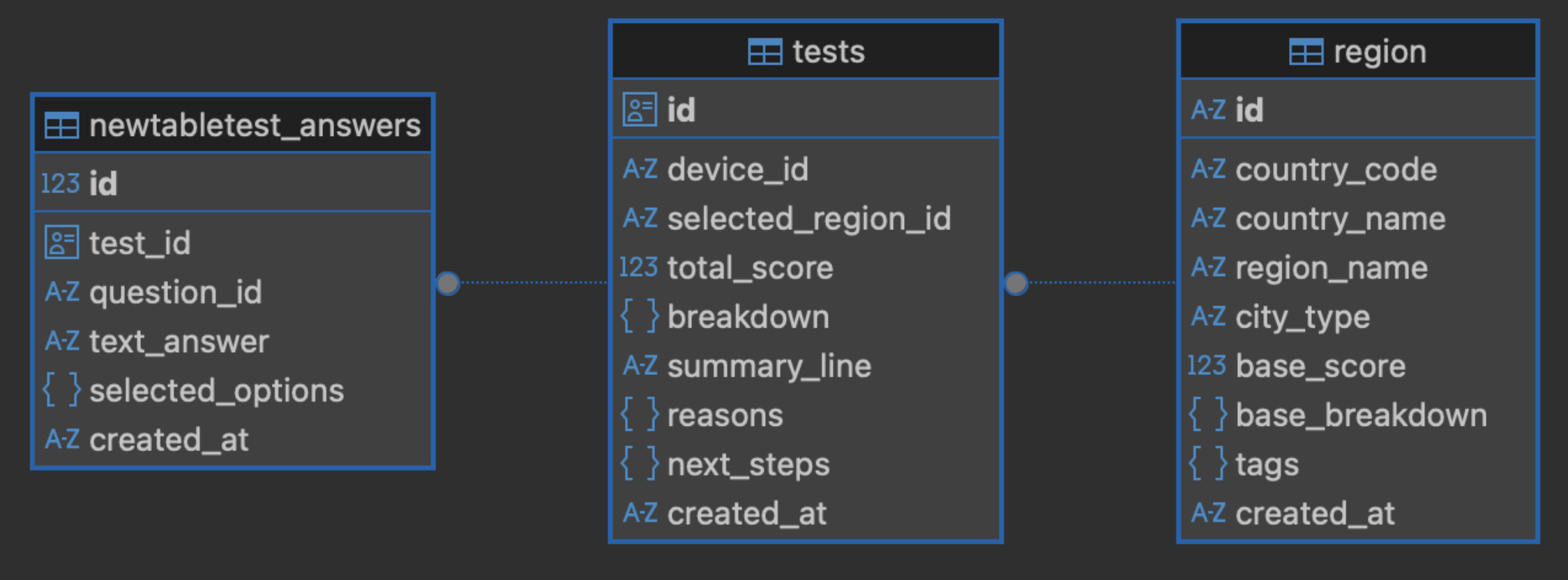
우선 지난주에 대략적으로 만들어둔 DB ERD를 바탕으로 SQLAlchemy 모델을 작성하였다